AWS incident response: investigating a compromised account
AWS account compromised? What to do first, which logs to secure, how to scope the attack in CloudTrail and how to contain it without destroying evidence.
TL;DR. Treat "our AWS account is compromised" as two jobs running in parallel: stop the bleeding (deactivate the credentials the attacker holds, kill what they launched) and preserve and read the logs (CloudTrail first, then S3 data events or access logs, VPC Flow Logs, GuardDuty findings and the IAM credential report). Scope before you clean: every IAM user, key, role trust and instance the attacker created must be found, or you will remove the entry point and leave the backdoor. The rest of this series goes deep on each step.
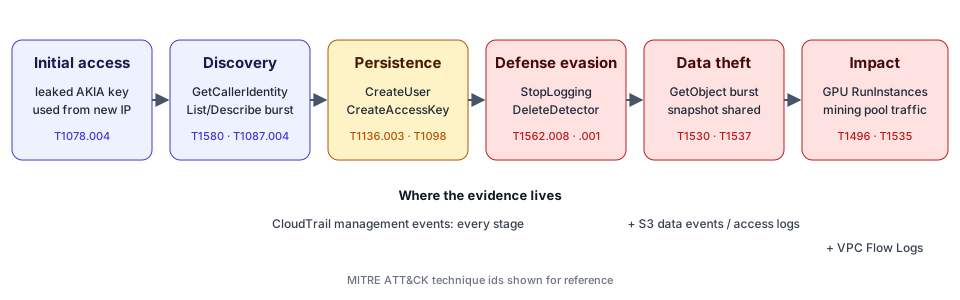
Most AWS incidents I see do not start with a zero-day. They start with a credential: an access key committed to a repository, a key left in CI logs, a console password without MFA, or a role that trusts too much. What follows is remarkably consistent — check the key works, enumerate, create a way back in, blind the defenders, then take data or burn compute. That consistency is good news for responders, because each step leaves a specific API call in CloudTrail.
Minute zero: signs that an AWS account is compromised
The trigger is usually one of these:
| Signal | Where it shows up | What it often means |
|---|---|---|
| Unexpected bill or cost-anomaly alert | Billing / Cost Explorer | GPU or large instances launched for crypto-mining |
| Email from AWS about an exposed key | Root account mailbox, support case | Key found in a public place; AWS may attach a quarantine policy |
GuardDuty finding such as PenTest:IAMUser/KaliLinux or UnauthorizedAccess:IAMUser/InstanceCredentialExfiltration.OutsideAWS | GuardDuty console or exported findings | Credentials used from an attacker's machine |
| IAM users, keys or roles nobody recognises | IAM console, credential report | Persistence already in place |
| CloudTrail trail stopped, GuardDuty detector gone | CloudTrail / GuardDuty status | Defense evasion — the attacker is past recon |
AWS documents the GuardDuty IAM finding types and publishes a managed policy, AWSCompromisedKeyQuarantineV3, that it can attach to an IAM user whose key it believes was exposed. If you find that policy attached to a user, you have a confirmed leak: do not remove it, and follow the support case.
First hour: contain without destroying evidence
Containment and evidence preservation pull in opposite directions only if you are careless. The order that works:
- Secure the logs you depend on. Download the CloudTrail objects for the period from the trail's bucket, export GuardDuty findings, and generate the IAM credential report. If the attacker has admin rights, they can delete trails and detectors; event history only keeps 90 days of management events per region. The log export guide lists the exact commands.
- Deactivate the credentials you know are compromised. For an IAM user key:
aws iam update-access-key --status Inactive. For a role session, use the IAM console's "Revoke active sessions", which adds a deny for tokens issued before now (AWS documentation). - Do not delete what you have not examined. Deleting an attacker-created user also deletes its inline policies and keys, which you want in the case file. Detach, deactivate, then delete after scoping.
- Stop the cost bleeding. Snapshot and stop or terminate unauthorised instances, in every region.
- Open a support case with AWS. Both the re:Post guidance on unauthorized activity and the aws-samples compromised credentials playbook recommend notifying AWS early.
Scoping: reading the attack in CloudTrail
Scoping means answering four questions, each with a pivot in CloudTrail:
- Which credential came in first? Pivot on
userIdentity.accessKeyIdandsourceIPAddress. A long-term access key (prefixAKIA) suddenly used from an address outside its history is the classic leaked-key pattern. Start with the leaked access key investigation. - What did it learn? A
GetCallerIdentitycall followed by dozens ofList*,Describe*andGet*calls within minutes, often withAccessDeniederrors, is enumeration. - What did it create?
CreateUser,CreateAccessKey,CreateLoginProfile,AttachUserPolicy,UpdateAssumeRolePolicy, new SAML/OIDC providers, key pairs, Lambda functions. The IAM persistence post covers each one. - What did it touch? S3 object reads (only visible with data events or server access logs), snapshots shared with other accounts, secrets read, instances launched.
The CloudTrail events every responder should know gives the full list with MITRE ATT&CK mappings. The goal at this stage is a timeline: every attacker action, in order, with the principal, key, IP and resource involved.
The pivots that matter
| Pivot | CloudTrail field | Why |
|---|---|---|
| Access key | userIdentity.accessKeyId | Follows one credential across services and regions |
| Principal | userIdentity.arn | Catches activity by users the attacker created |
| Source IP | sourceIPAddress | Finds every credential used from the attacker's host |
| User agent | userAgent | Kali, Pacu or unusual SDK versions stand out |
| Region | awsRegion | Attackers like regions nobody watches |
| Errors | errorCode | Probing leaves AccessDenied trails |
Keep your pivots going until they stop producing new entities. The attacker's IP will lead you to a second key; the second key to a user; the user to a role it assumed.
Scoping beyond CloudTrail
CloudTrail management events tell you what was configured. They do not tell you which objects were read or how many bytes left a VPC. For that you need S3 data evidence and VPC Flow Logs analysis. If those sources were never enabled, say so in the report instead of concluding that nothing was taken — the limitations of log-only investigation are worth reading before you write any conclusion.
If the way in was not an AWS credential at all but a federated identity, the evidence starts in the identity provider: an Okta-driven sign-in is better investigated with oktaforensics.com, and a key leaked from a repository with githubforensics.com. For compromised EKS workloads, the Kubernetes audit log matters as much as CloudTrail (kubernetesforensics.com).
Eradication: remove every foothold
Once the timeline is stable, clean up in this order:
- Deactivate then delete every access key created during the incident.
- Delete attacker-created IAM users (after saving their policies), login profiles and MFA devices.
- Detach administrator policies granted during the incident; review who else holds them.
- Revert role trust policy changes and delete unknown identity providers.
- Remove public Lambda permissions, function URLs without auth, EC2 key pairs and modified user data.
- Re-enable CloudTrail, GuardDuty, Config and any security service the attacker disabled — in every region.
- Rotate every secret the attacker could read.
Consider a service control policy that denies unused regions if you run AWS Organizations: it removes the attacker's favourite hiding place.
How the tool fits in
AWS Forensics runs this scoping step in your browser. Drop the exported CloudTrail files (plus flow logs, S3 access logs, GuardDuty findings and the credential report if you have them) and it returns a verdict — Clean, Suspicious or Compromised — with the findings, the evidence rows behind each one, a timeline and a remediation checklist ordered containment first. Nothing is uploaded. The step-by-step analysis guide shows the workflow, and the fictional incident walkthrough runs it end to end on the sample data.
The verdict is a triage aid, not a conclusion. It is only as good as the logs you give it, and every finding shows its evidence so you can confirm or dismiss it.
FAQ
How do I know if my AWS account was compromised?
Look in CloudTrail for API calls you cannot attribute: a long-term access key used from an unfamiliar IP address, IAM users or keys nobody created, GuardDuty or CloudTrail being disabled, instances in regions you never use, or bulk S3 downloads. A billing spike or a GuardDuty finding is often the first visible sign.
Should I delete the compromised access key immediately?
Deactivate it first rather than delete it. An inactive key can no longer sign requests, but it still exists, which keeps the investigation straightforward. Delete it once you have scoped what it did and replaced it everywhere it was legitimately used.
Do I need to contact AWS?
AWS asks customers to open a support case when they suspect compromised credentials, and it is the route for questions about unauthorised charges. The support case does not replace your own investigation of CloudTrail.
Further reading
- AWS Security Incident Response Guide — AWS's own IR process.
- Remediating potentially compromised AWS credentials — GuardDuty documentation.
- Incident response guide for AWS CloudTrail investigations — AWS Security Blog.
- MITRE ATT&CK IaaS matrix — the techniques referenced across this series.